.jpg)
How to Set Up Departmental Accounts in MoneyWorks—A Smarter Way to Track Costs

Updated: May 2
For businesses with multiple departments or business units, tracking individual profitability shouldn't require a messy Chart of Accounts. While many rely on the 'sub-ledger' method, MoneyWorks Departmental Accounting enables you to track income, expenses, and assets by business unit using a single account code. This keeps your ledger scalable and clean, even as you add new departments.
What is departmental accounting?
Departmental accounting is a way for businesses to track the finances of each department separately. Instead of viewing the company's profitability as a single whole, it breaks things down so management can see exactly how each team, division, business unit, or branch is performing on its own. Departmental accounting helps the business identify which departments are making money or incurring high expenses, and how to make smarter decisions—what to cut and what to improve.
The Problem Alan started a chauffeured service. He has a fleet of luxury vehicles and drivers, and offers chauffeuring services to hotels and corporations. Alan knows his company’s average monthly revenue is $400,000 and that motor-related expenses are about $150,000, but he has difficulty understanding the expenses for each vehicle.
Sub-ledger method
Some may have resolved it by creating a sub-ledger. For example, the accountant may create a main revenue or expense account and add each business unit (in Alan's case, the vehicle) to that account.
40000: Sales Income
40001: Sales Income - Car 1
40002: Sales Income - Car 2
40003: Sales Income - Car 3
60000: Motor Expense
60001: Motor Expense - Car 1
60002: Motor Expense - Car 2
60003: Motor Expense - Car 3
The Sub-ledger method works, but it can become confusing with many business units, and you may need to export the report to a spreadsheet and use formulas to separate the data. Besides, the account list grows as the business unit grows. Imagine you have 15 related accounts and 10 cars; you need to create 150 accounts, and 450 if you have 30 cars.
Departmental Account
Let's say Alan is using MoneyWorks accounting software. He can use the built-in departmental account feature to track the income and expenses, as well as the assets and liabilities, of his vehicles.
Instead of creating a lengthy list of accounts, he can maintain only the main account.
40000: Sales Income
60501: Petrol
60502: Salary
60503: Parking fee
60504: Repair and Maintenance
60505: Loan Interest
60506: Car Insurance
60507: Road Tax
60508: Depreciation
And create the business unit (or cost centre) as departments.
How to set up departments in MoneyWorks
There are three components in departmental account setup:
Departments
Department Group
Link the Department Group to the account

Departments
The department is the business unit. In Alan's case, his business unit is his vehicles.
Go to the Show menu and select Departments; then click the New button in the Departments list to add the vehicle. Alan can use the car plate number (e.g., 1234, 2345, 3456, etc.) as a department code instead of Car1, Car2, and Car3 to simplify reporting. Then enter the car description in the department description.
A sample department:
Code: 1234
Description: Toyota Alphard SXX1234A
Department Group
Next, Alan needs a Department Group. A Department Group is a container that groups all related departments.
Go to the Show menu again, then select Department Groups. Create a Department Group (such as CARS), then click the Add button to add the departments (vehicles) to it. For example:
Code: CARS
Description: Cars (or Vehicles or something you prefer)
Departments that belong to this group:
1234
2345
3456

Note: the maximum number of characters for the Department and Department Group codes is five.
Link Department Group to the Account
After you have created the Departments and Department Group, you need to instruct the system which account you want to track by department.
Select the Account list from the Show menu, then modify the account you wish to edit and tag it to the appropriate Department Group. For example:
Code: 40000
Description: Sales
Dept Group (Department Group): CARS
Code: 60505
Description: Loan Interest
Dept Group: CARS
Record a transaction
Here's how it works when entering a transaction:
Let's say Alan needs to record a $550 payment for the car loan interest on car number 1234.
He initiates a new payment transaction, enters the payee, date, and voucher number, then selects the loan interest expense account 60505. Because Alan has already tagged the CARS Department Group to the loan interest expense account, MoneyWorks will prompt Alan to select a Department from the Department list next to the account.

Click Department 1234 from the list, enter $550 in the Net amount field, and select the appropriate GST code in the TX column.

The detail line shows the account as 60505-1234 and the account name “Loan Interest (Toyota Alphard SXX1234A)”. A hyphen joins the department to the account code.
Department vs Sub-ledger method
Although the department is similar to a sub-ledger, it maintains a cleaner, shorter account list, and Alan adds a department to the department list rather than adding multiple accounts whenever he creates a new department (Vehicle).
Chart of Accounts comparison:
Sub-ledger Method | Department Method |
Petrol-1234 Petrol-2345 Petrol-3455 | Petrol |
Salary-1234 Salary-2345 Salary-3456 | Salary |
Parking-1234 Parking-2345 Parking-3456 | Parking |
Depreciation-1234 Depreciation-2345 Depreciation-3456 | Depreciation |
Repair and Maintenance-1234 Repair and Maintenance-2345 Repair and Maintenance-3456 | Repair and Maintenance |
Loan interest-1234 Loan interest-2345 Loan interest-3456 | Loan interest |
Insurance-1234 Insurance-2345 Insurance-3456 | Insurance |
Road Tax-1234 Road Tax-2345 Road Tax-3456 | Road Tax |
Reporting
Instead of exporting the lengthy reports to a spreadsheet for sorting, you can print the Profit and Loss statement for each department directly from the MoneyWorks software, which shows you the revenue, expenses, and the bottom line for each department.
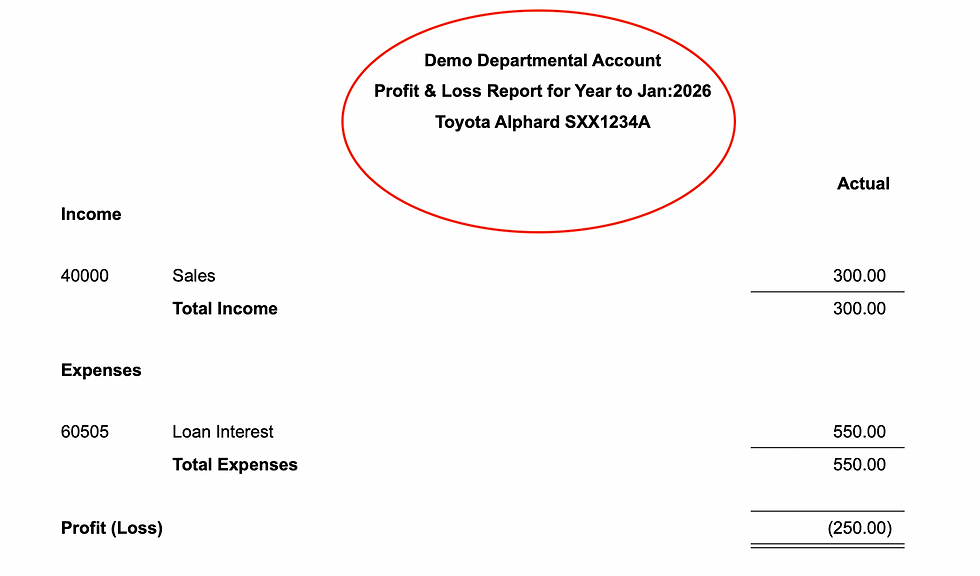

Alternatively, you can create a department-by-department analysis report to compare each department's revenue or analyse each department's monthly expenses.


Summary
Departmental accounting gives businesses a cleaner, more scalable way to track performance across teams, vehicles, branches, or any business unit—without bloating your chart of accounts. Unlike the sub-ledger method, which multiplies accounts as your business grows, MoneyWorks’ department feature lets you add a single department code and instantly track income and expenses across all tagged accounts. For Alan's chauffeur business, this means knowing exactly how each vehicle performs—without manual workarounds.


The track system is engineered for durability and smooth operation, reducing the likelihood of frequent repairs. By following basic maintenance solasafe sunscreen guidelines, property owners can preserve the appearance and functionality of their blinds for many years.
These measurements help farriers make informed trimming and shoeing decisions that support proper limb alignment. Some professionals Farrier Tools List: What Tools Does a Farrier Use? also use rulers, calipers, and digital assessment tools to track hoof growth and monitor changes over time.